Synoxa
No Administrator permission
Tickets, suggestions, giveaways, backups, service monitoring. You invite it, type three commands, and it's set up.
Try the demo: click “Open a Ticket”
Features
Nine modules, all in the same bot.

Panels, categories, statuses and priorities, staff claiming, automatic reminders, statistics, encrypted transcripts and AI summaries.
Ready-made replies so you never retype the same messages in tickets.

Members suggest and vote, staff accept or decline in one click.
Monitor your websites, APIs and game servers (HTTP or TCP). Outage alerts, live-updating status panel.

Run contests, draw winners automatically, and reroll when needed.
Back up your server's roles and channels, and restore them in one click.

Kick, ban, mute, warnings, bulk roles, channel locking and anti-scam detection.

Support role, categories, prefix, ticket names, channels, language: everything is set per server.

Custom embeds, detailed help with .help, emoji info and a few other small commands.
One click, no Administrator permission.
Support role, ticket category, first panel: three commands.
Your members open tickets, your staff handle them.
/setup support · /setup category · /setup panel create
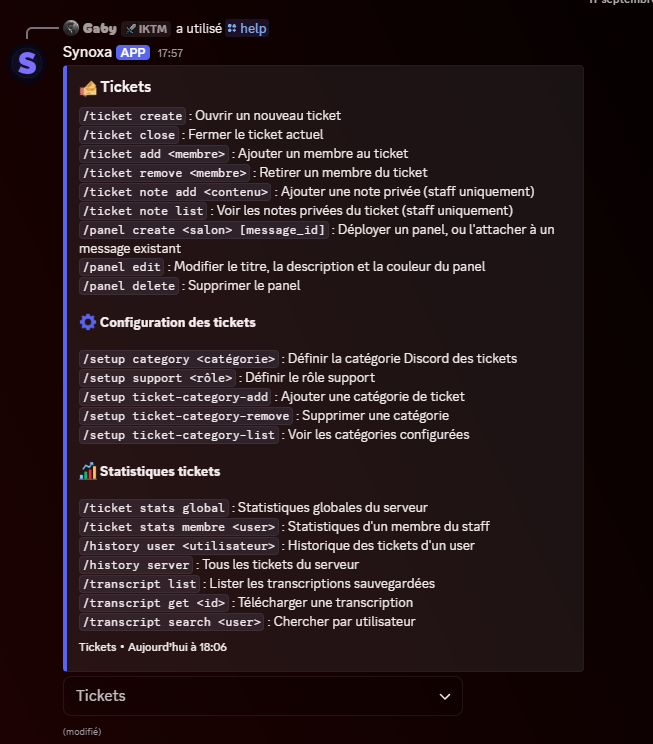
Bot help
This is the menu your members will see on Discord. Open it, pick a category or search for a command.
Tickets
Complete ticket system with panels, customizable categories, statistics and automatic transcripts.
Security and data
A ticket bot sees private conversations. Here is what Synoxa does to limit the risks.
Read the privacy policyTicket transcripts can be encrypted on disk (AES-256-GCM).
The invite link only asks for the permissions the bot needs to work.
If you remove the bot, your server's data is deleted after 30 days.
A sanction is only possible if the moderator is above the targeted person.